
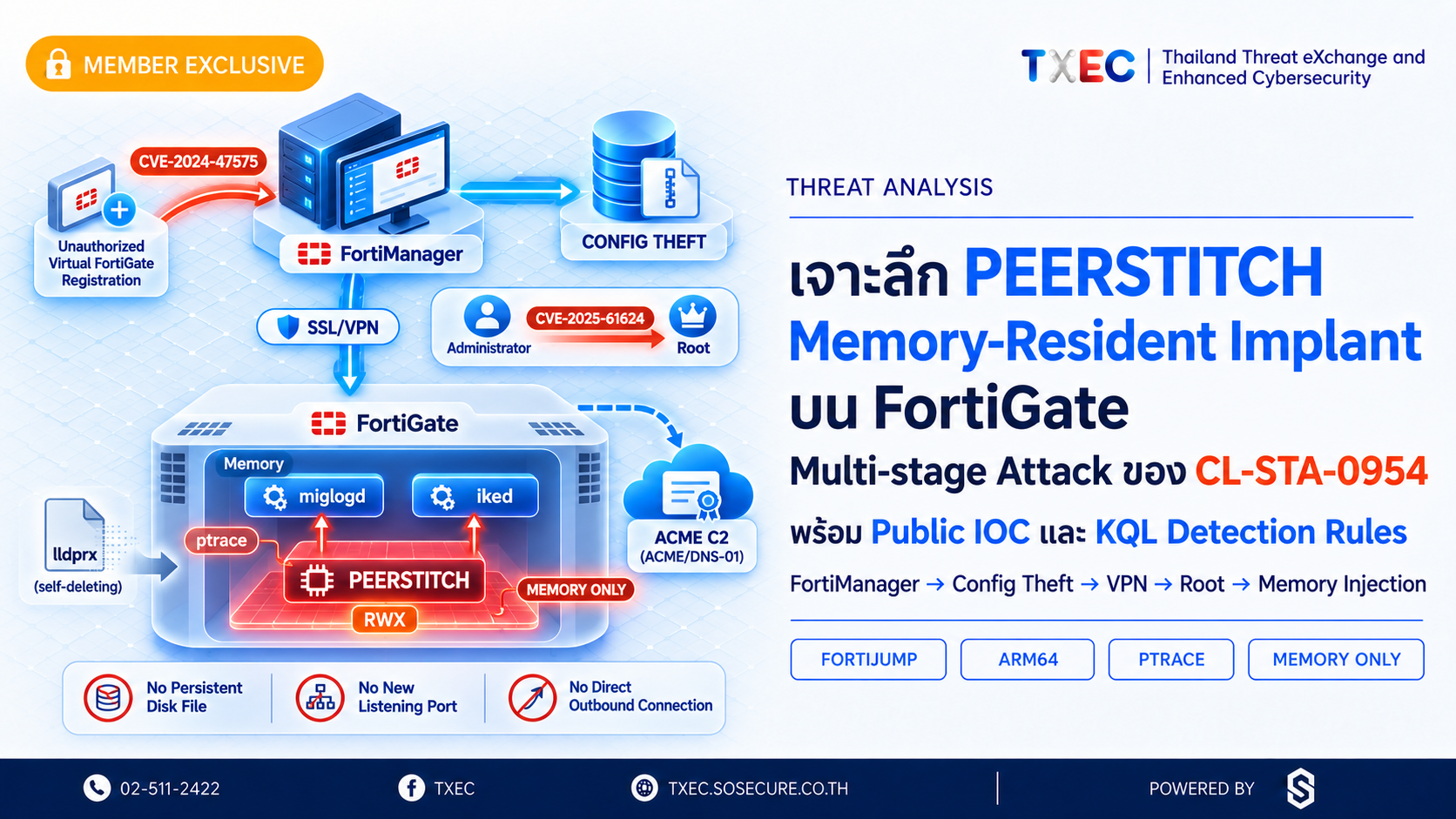
⚠️ หมายเหตุการเผยแพร่: รายงานฉบับนี้เป็นการวิเคราะห์เชิงเทคนิคของ CL-STA-0954 (UNC5820) และมัลแวร์ PEERSTITCH โดยทีม TXEC จากการรวบรวม Threat Intelligence, MITRE ATT&CK Mapping, Public IOC และ Detection Rule ที่อ้างอิงจากรายงาน Palo Alto Networks Unit 42 (14 ตุลาคม 2569), Fortinet PSIRT และแหล่งข้อมูลสาธารณะที่น่าเชื่อถือ เพื่อสนับสนุนการทำ Threat Hunting และการพัฒนา Detection ภายในองค์กรสมาชิก รายงานเป็นการวิเคราะห์จากข้อมูลสาธารณะ มิใช่ผลการตรวจพิสูจน์อุปกรณ์ขององค์กรผู้รับรายงานโดยตรง
บทสรุป (Summary)
CL-STA-0954 (หรือที่ Mandiant/Google ติดตามในชื่อ UNC5820) คือกลุ่มผู้โจมตีที่ Palo Alto Networks Unit 42 ระบุในแคมเปญ REF9334 ซึ่งมุ่งเป้าหมายเป็นผู้ให้บริการโทรคมนาคม โดยเริ่มกิจกรรมตั้งแต่เดือนกันยายน 2024 การโจมตีเริ่มต้นจากการใช้ CVE-2024-47575 (FortiJump) ซึ่งเป็นช่องโหว่ Authentication Bypass ใน FortiManager ผ่าน TCP Port 541 เพื่อลงทะเบียน Virtual FortiGate ปลอมและขโมย Configuration ของ FortiGate มากกว่า 500 เครื่อง จากนั้นนำ Valid Credentials ที่ได้มาสร้าง SSL/VPN Session เข้าถึงเครือข่ายภายใน ก่อนยกระดับสิทธิ์สู่ Root ด้วย CVE-2025-61624 และติดตั้งมัลแวร์ PEERSTITCH บน FortiGate เป้าหมาย
PEERSTITCH คือ Memory-Resident Implant สำหรับสถาปัตยกรรม ARM64 ที่ใช้ ptrace-based Process Memory Injection เพื่อฝัง Payload (ขนาด 1,344 bytes) ลงใน Process /bin/miglogd และ /bin/iked ของ FortiOS โดยจัดสรร RWX Memory 16,384 bytes และสื่อสารภายในผ่าน /proc/<pid>/mem มัลแวร์ไม่เปิด Listening Port ใหม่และไม่สร้าง Outbound Connection จากตัว Implant โดยตรง ทำให้การตรวจจับด้วยวิธีทั่วไปอย่าง File-based Detection หรือ Network IOC Matching อย่างเดียวไม่เพียงพอ นอกจากนี้ยังพบ Apache mod_md / ACME Abuse เป็นช่องทาง C2 แยกต่างหาก พร้อมพฤติกรรม Anti-Forensics ที่หยุด miglogd/syslogd และลบหลักฐานการโจมตี
รายงานฉบับนี้ครอบคลุมการวิเคราะห์ Attack Flow 9 ขั้นตอน, ผลการวิเคราะห์ทางเทคนิคเชิงลึก, Public IOC ที่ตรวจยืนยันแล้ว, Microsoft Sentinel KQL Detection Rules 3 ชุด, MITRE ATT&CK Mapping และข้อเสนอแนะด้าน Containment, Detection และ System Hardening สำหรับองค์กรที่ใช้งาน Fortinet FortiManager และ FortiGate

1. บทนำ
Palo Alto Networks Unit 42 เผยแพร่รายงาน "Unit 42 Uncovers PEERSTITCH, a Stealthy FortiGate Implant" เมื่อวันที่ 14 ตุลาคม 2569 โดยอธิบายการโจมตีแบบ Multi-stage Intrusion ของกลุ่ม CL-STA-0954 ซึ่งเริ่มต้นจากการใช้ช่องโหว่ CVE-2024-47575 บน FortiManager และสิ้นสุดด้วยการติดตั้ง Memory-Resident Implant ชื่อ PEERSTITCH บนอุปกรณ์ FortiGate ผ่านเทคนิค Process Memory Injection
สิ่งที่ทำให้กรณีนี้มีความสำคัญเป็นพิเศษคือ PEERSTITCH ถูกออกแบบให้ทำงานอยู่ในหน่วยความจำของ Process ที่ถูกกฎหมายของ FortiOS โดยไม่ต้องสร้างไฟล์ถาวรบน Disk ไม่เปิด Port ใหม่ และไม่สร้าง Outbound Connection จากตัวมันเองโดยตรง ซึ่งหมายความว่าองค์กรที่พึ่งพาเพียง File-based Antivirus, Static IOC Matching หรือการตรวจสอบ Network Connection ที่ผิดปกติ อาจไม่สามารถตรวจพบการติดตั้งมัลแวร์นี้ได้
ประเด็นที่สองคือ FortiManager เป็น Single Point of Management สำหรับ FortiGate จำนวนมาก การบุกรุกระบบนี้เพียงระบบเดียวสามารถเปิดเผย Configuration, Credentials และ Cryptographic Material ของอุปกรณ์ทั้งองค์กร ทำให้เส้นทางการขยายการโจมตีกว้างกว่าการบุกรุก Endpoint ทั่วไปอย่างมีนัยสำคัญ
ข้อมูลนี้จัดทำขึ้นโดย TXEC Team เพื่อสรุปผลการวิเคราะห์กรณีศึกษา CL-STA-0954 / PEERSTITCH พร้อม Detection Rule ที่พร้อมนำไปปรับใช้กับ Microsoft Sentinel สำหรับทีม SOC ที่ต้องการ Hunt ภัยคุกคามในสภาพแวดล้อม Fortinet
2. กระบวนการวิเคราะห์ (Analysis Process)
ทีม TXEC ดำเนินการรวบรวมและวิเคราะห์ข้อมูลภัยคุกคามจากแหล่งสาธารณะที่น่าเชื่อถือเกี่ยวกับ CL-STA-0954 (UNC5820) และมัลแวร์ PEERSTITCH โดยแบ่งกระบวนการทำงานออกเป็น 5 ขั้นตอนหลัก
ขั้นตอนที่ 1: Scoping & Framing — กำหนดขอบเขตการศึกษา CL-STA-0954 ครอบคลุมลำดับการโจมตีตั้งแต่ FortiManager Exploitation, Configuration Theft, Credential Reuse, Privilege Escalation, Process Memory Injection และ Command and Control รวมถึงพฤติกรรม Defense Evasion
ขั้นตอนที่ 2: Evidence Identification & Collection — รวบรวมรายงาน Palo Alto Networks Unit 42, ประกาศช่องโหว่จาก Fortinet PSIRT และ CVE.org รวมถึง Public IOC และ Technical Artifact เช่น IP Address, Serial Number, File Name, Auto-script Path และพฤติกรรมของ FortiOS Process
ขั้นตอนที่ 3: Examination & Filtering — ตรวจสอบความสอดคล้องของข้อมูลจากหลายแหล่ง แยก Confirmed Behavior ออกจากข้อประเมินของผู้วิจัย และคัดกรอง IOC ตามประเภท ความเกี่ยวข้อง และช่วงเวลาของเหตุการณ์
ขั้นตอนที่ 4: Correlation Analysis — เชื่อมโยงลำดับการโจมตีทั้ง 9 ขั้นตอน วิเคราะห์ Apache mod_md/ACME Abuse เป็นช่องทาง C2 แยก และออกแบบ KQL Detection Rules สำหรับ Microsoft Sentinel โดยอิงพฤติกรรมที่ยืนยันแล้ว
ขั้นตอนที่ 5: Reporting & Conclusion — สรุปผลในรูปแบบ Exclusive Content พร้อมจัดทำ Public IOC, MITRE ATT&CK Mapping, Detection Rules 3 ชุด และข้อเสนอแนะแบบ 3 ระดับ
3. บริบทผู้โจมตีและ Attack Flow
3.1 CL-STA-0954 / UNC5820 — ภาพรวม
CL-STA-0954 (UNC5820 ตาม Mandiant/Google) ปรากฏในแคมเปญ REF9334 ซึ่ง Unit 42 ติดตาม กิจกรรมการโจมตีเริ่มต้นในเดือนกันยายน 2024 โดยมุ่งเป้าหมายเป็นผู้ให้บริการโทรคมนาคม แรงจูงใจหลักน่าจะเป็น Strategic Intelligence Collection มากกว่าการโจมตีเพื่อผลประโยชน์ทางการเงินโดยตรง เนื่องจากไม่มีหลักฐาน Ransomware หรือ Double Extortion
ลักษณะเด่นของกลุ่มนี้คือความสามารถพัฒนา Custom Malware (PEERSTITCH) ที่เจาะจงสถาปัตยกรรม ARM64 ของ FortiGate และมีความเข้าใจเชิงลึกเกี่ยวกับ FortiOS Internals เช่น Process Structure, Daemon Behavior และกลไก Apache mod_md ซึ่งบ่งชี้ถึงระดับความสามารถ Nation-State หรือ Nation-State Affiliated Actor
3.2 Attack Flow 9 ขั้นตอน
หมายเหตุ: กิจกรรมบางส่วนอาจเกิดขึ้นต่อเนื่องหรือซ้อนทับกัน ลำดับนี้เรียบเรียงเพื่อสนับสนุนงาน Threat Hunting และ Incident Response
ขั้นตอนที่ 1 — CVE-2024-47575 / FortiManager Initial Access
ใช้ CVE-2024-47575 เข้าถึง FortiManager ผ่าน FMG-Access (TCP/541) และลงทะเบียน Virtual FortiGate ปลอมชื่อ localhost
- หลักฐานที่ควรตรวจ: FortiManager Event Log, FGFM Connection, Source IP, Device Registration Log, Serial Number
FMG-VMTM23017412
ขั้นตอนที่ 2 — Configuration Archive Theft
สร้างไฟล์ Configuration Archive ชื่อ .tm และนำข้อมูล Configuration ของ FortiGate มากกว่า 500 เครื่อง รวมถึง Database, Credentials และ Cryptographic Material ออกจากระบบ
- หลักฐานที่ควรตรวจ: Configuration Archive,
global.db,revinfo.db, Transfer Log, Device Inventory
ขั้นตอนที่ 3 — Network Sniffing via FortiManager
ใช้ FortiManager ส่งการตั้งค่า Packet Capture ไปยัง FortiGate เพื่อทำ Reconnaissance และ Network Sniffing (HTTP, RADIUS, LDAP, TCP 3696–3706)
- หลักฐานที่ควรตรวจ: FortiGate Sniffer Configuration, Configuration Revision Log, Network Traffic Log
ขั้นตอนที่ 4 — Valid Credential Reuse / SSL/VPN Access
ใช้ Valid Credentials ที่ขโมยได้สร้าง SSL/VPN Session จากโครงสร้างพื้นฐานภายนอก เข้าถึงเครือข่ายบริหารจัดการภายใน
- หลักฐานที่ควรตรวจ: SSL/VPN Authentication Log, Source IP
23.240.77[.]233,47.18.167[.]159, Username, Login Timestamp
ขั้นตอนที่ 5 — CVE-2025-61624 / Privilege Escalation
ใช้ CVE-2025-61624 ผ่าน FortiOS system.auto-script Path Traversal (../../../../setup) เพื่อยกระดับสิทธิ์จาก Administrator ไปสู่ Root
- หลักฐานที่ควรตรวจ: FortiOS Configuration Log,
system.auto-scriptObject, Path Traversal Pattern, Administrator Activity
ขั้นตอนที่ 6 — Staging File Download
ดาวน์โหลด Staging Files ผ่าน HTTP Port 8085 ประกอบด้วย pM.js, index.js, index.wasm, ipssem.js และ lldprx (ARM64 ELF Injector)
- หลักฐานที่ควรตรวจ: HTTP Connection Log, Destination IP/Port 8085, File Name, SHA-256, File Creation และ Execution Artifact
ขั้นตอนที่ 7 — PEERSTITCH Process Memory Injection
PEERSTITCH ใช้ ptrace-based Process Memory Injection เพื่อฝัง Payload (1,344 bytes) ลงใน /bin/miglogd และ /bin/iked โดยจัดสรร 16,384 bytes RWX Memory สื่อสารผ่าน /proc/<pid>/mem; lldprx Self-delete หลังส่ง Payload
- หลักฐานที่ควรตรวจ: Process Memory Map, RWX Memory Region,
/proc/<pid>/mem, Daemon Integrity, Crashlog
ขั้นตอนที่ 8 — Apache mod_md / ACME C2
ใช้ Apache mod_md / ACME เป็นช่องทาง C2 แยกต่างหาก โดยดัดแปลง DNS-01 Challenge เพื่อ Trigger Node.js Execution และสร้าง Reverse Shell
- หลักฐานที่ควรตรวจ:
md-acme.conf,account.json,order.json,job.json, ACME Network Traffic, DNS-01 Challenge Activity
ขั้นตอนที่ 9 — Anti-Forensics / Defense Evasion
ดำเนินการ Anti-Forensics หยุด miglogd/syslogd, ลบ Crashlog, ลบ Rogue Account/VPN Group/Auto-script, Overwrite Configuration, ลบไฟล์ Injector
- หลักฐานที่ควรตรวจ: FortiOS System Log, Syslog Gap, Service Termination, Configuration Revision, Deleted Artifact
4. ผลการวิเคราะห์ทางเทคนิคเชิงลึก
4.1 CVE-2024-47575 (FortiJump) — Authentication Bypass ใน FortiManager
CVE-2024-47575 หรือที่รู้จักในชื่อ FortiJump เป็นช่องโหว่ Authentication Bypass ใน FortiManager ที่เปิดโอกาสให้ผู้โจมตีจากระยะไกลส่งคำขอที่สร้างขึ้นเป็นพิเศษผ่าน FMG-Access Protocol ที่ใช้ TCP Port 541 เพื่อดำเนินคำสั่งบนระบบโดยไม่ต้องผ่านการพิสูจน์ตัวตน ช่องโหว่นี้ประกาศและแก้ไขโดย Fortinet PSIRT เมื่อ 23 ตุลาคม 2024
ผู้โจมตีลงทะเบียน Virtual FortiGate ปลอม ภายใต้ชื่อ localhost โดยใช้ Serial Number FMG-VMTM23017412 เพื่อผ่าน FortiManager Authorization Check ก่อนสร้างไฟล์ Configuration Archive ชื่อ .tm และนำข้อมูลออก ไฟล์ Archive ดังกล่าวประกอบด้วย Running Configuration ของ FortiGate มากกว่า 500 เครื่อง, ฐานข้อมูล global.db และ revinfo.db ของ FortiManager, รายละเอียด Interface, Routing, Firewall Policy, VPN Configuration, Network Topology, Administrative Credentials และ Cryptographic Material
ประเด็นที่ TXEC เน้นย้ำ: จำนวน 500+ เครื่องคือจำนวน FortiGate ที่ข้อมูลถูกเปิดเผย ไม่ใช่จำนวนเครื่องที่ยืนยันว่าติดตั้ง PEERSTITCH การประเมิน Exposure ต้องพิจารณาแยกระหว่าง "ข้อมูลถูกเปิดเผย" กับ "อุปกรณ์ถูกบุกรุก"
4.2 Network Sniffing และ Valid Credential Reuse
ภายหลังการเข้าถึง FortiManager ผู้โจมตีใช้ความสามารถ Centralized Management ส่งการตั้งค่า Packet Capture ไปยัง FortiGate ปลายทาง เพื่อดักจับข้อมูลที่ไม่ถูก Encrypt ผ่านบริการต่าง ๆ ได้แก่ HTTP, TFTP, RADIUS, LDAP และ TCP Port 3696–3706 กิจกรรมนี้ไม่ต้องติดตั้งเครื่องมือเพิ่มเติมเพราะอาศัย FortiOS Built-in Packet Capture Feature ซึ่งทำให้ตรวจจับผ่าน Network Traffic Anomaly ได้ยาก แต่จะปรากฏเป็น Configuration Revision ที่ผิดปกติใน FortiGate Configuration Log
ข้อมูล Credentials ที่ขโมยจาก Configuration Archive ถูกนำมาใช้สร้าง SSL/VPN Session จาก IP Address 23.240.77[.]233 และ 47.18.167[.]159 ซึ่งเป็น Source IP ภายนอกขององค์กรเป้าหมาย เพื่อเข้าถึงเครือข่ายบริหารจัดการภายในโดยตรง
4.3 CVE-2025-61624 — Privilege Escalation ผ่าน FortiOS Auto-script
CVE-2025-61624 เป็นช่องโหว่ Path Traversal ในกลไก system.auto-script ของ FortiOS ที่อนุญาตให้ FortiOS Administrator ซึ่งปกติมีสิทธิ์จำกัด สามารถยกระดับสิทธิ์ไปสู่ Root ของระบบปฏิบัติการได้ โดยใช้ Path Traversal Pattern ../../../../setup เพื่อ Execute Script ที่อยู่นอกเส้นทางที่กำหนด
ช่องโหว่นี้เป็น Stepping Stone สำคัญที่เปลี่ยนสิทธิ์ Administrator (ซึ่งขโมยมาจาก Configuration Archive) เป็น Root ซึ่งจำเป็นสำหรับการทำ ptrace-based Process Memory Injection ในขั้นตอนถัดไป ช่องโหว่นี้ประกาศโดย Fortinet PSIRT ในชื่อ FG-IR-26-122
4.4 PEERSTITCH — Memory-Resident Implant เชิงลึก
PEERSTITCH เป็นมัลแวร์ที่มีลักษณะพิเศษหลายประการที่แตกต่างจาก Malware ทั่วไป ทำความเข้าใจกลไกแต่ละส่วนมีความสำคัญต่อการออกแบบ Detection ที่มีประสิทธิภาพ
ชุดไฟล์ติดตั้ง (Staging Files):
pM.js,index.js,index.wasm,ipssem.js— ชุด Script/WASM ที่ทำงานร่วมกันlldprx— ARM64 ELF Native Injector หลัก; ทำ ptrace เพื่อ Inject ลงใน Target Process และ Self-delete หลังส่ง Payload สำเร็จ- ดาวน์โหลดผ่าน HTTP Port 8085 จาก Infrastructure ของผู้โจมตี
กลไก Process Memory Injection:
PEERSTITCH ใช้ System Call ptrace(PTRACE_ATTACH, ...) เพื่อแนบตัวเองกับ Target Process ก่อนเขียน Payload ผ่าน /proc/<pid>/mem ซึ่งเป็นช่องทาง Linux ที่ถูกต้องสำหรับการอ่าน/เขียน Process Memory
- จัดสรร 16,384 bytes ของ RWX (Read-Write-Execute) Memory Region
- Payload มีขนาด 1,344 bytes และ Hook เส้นทางการทำงานภายใน Process เป้าหมาย
- Target Process:
/bin/miglogd(Logging Daemon) และ/bin/iked(IKE/IPsec VPN Daemon) - Internal Data Matching ใช้ Marker
8550และ IP169.254.0.1— เป็น In-memory Identifier ไม่ใช่ External C2 Address
เหตุผลที่เลือก miglogd และ iked:
miglogdเป็น Logging Process ที่มีสิทธิ์สูงและทำงานตลอดเวลา การ Inject เข้าไปทำให้ Payload ทำงานอย่างต่อเนื่องikedเกี่ยวข้องกับ VPN Tunnel ซึ่งอาจให้ Visibility เข้าถึง Encrypted Traffic Metadata- ทั้งสอง Process มีสิทธิ์เพียงพอสำหรับกิจกรรม Post-compromise แต่เป็น Process ที่คุ้นเคยและไม่ทำให้เกิด Alert ทันที
ผลต่อ Detection: มัลแวร์ไม่มีไฟล์ถาวรบน Disk หลังจาก lldprx Self-delete ไม่เปิด Network Port ใหม่ ไม่สร้าง Outbound Connection จากตัวมันเอง ทำให้ File Integrity Monitoring, Static Hash Detection และ Network Flow Anomaly Detection ไม่เพียงพอ — ต้องพัฒนา Detection ที่มุ่งที่ Process Memory Integrity และ Daemon Behavioral Anomaly
4.5 Apache mod_md / ACME Abuse — C2 Channel สำรอง
ผู้โจมตีพบว่า FortiOS บางเวอร์ชันรองรับ Apache mod_md ซึ่งเป็น Module สำหรับจัดการ TLS Certificate อัตโนมัติผ่านโปรโตคอล ACME (Automated Certificate Management Environment) ผู้โจมตีดัดแปลงการตั้งค่า ACME เพื่อใช้ DNS-01 Challenge เป็น Trigger สำหรับ Execute Node.js และสร้าง Reverse Shell
ไฟล์ที่เกี่ยวข้องกับช่องทางนี้ได้แก่ md-acme.conf, account.json, order.json และ job.json กลไกนี้แยกต่างหากจาก PEERSTITCH และสร้าง C2 Channel ที่อาศัย HTTPS/DNS Traffic ซึ่งดูเหมือน Legitimate ACME Certificate Renewal Activity ทำให้ตรวจจับได้ยากหากไม่มี Allowlist สำหรับ ACME Server ที่ใช้จริง
5. แหล่งข้อมูลและผลการตรวจสอบ
- ▸ Palo Alto Networks Unit 42 (14 ตุลาคม 2569) — Primary Source สำหรับ CL-STA-0954 (UNC5820), Attack Flow, PEERSTITCH Behavior, Apache mod_md Abuse และ Public IOC → ผลตรวจ: ยืนยัน CVE-2024-47575 Exploitation, Configuration Theft, SSL/VPN Credential Reuse, CVE-2025-61624 Privilege Escalation, Staging Files, Process Memory Injection ลงใน miglogd/iked, ACME Abuse และ Anti-Forensics
- ▸ Fortinet PSIRT — FG-IR-24-423 (23 ตุลาคม 2024) — Vendor Confirmation สำหรับ CVE-2024-47575 → ผลตรวจ: ยืนยัน CVSS Critical, Authentication Bypass ผ่าน FGFM (TCP/541), Affected Products และ Fixed Versions
- ▸ Fortinet PSIRT — FG-IR-26-122 — Vendor Confirmation สำหรับ CVE-2025-61624 → ผลตรวจ: ยืนยัน Path Traversal ใน FortiOS CLI
system.auto-script, Privilege Escalation จาก Administrator → Root - ▸ CVE.org — CVE-2025-61624 — Vulnerability Reference → ผลตรวจ: ยืนยัน CVE Record, Severity และ Affected Versions
- ▸ MITRE ATT&CK Framework — Technical Classification Framework → ผลตรวจ: ครอบคลุม T1190, T1078, T1040, T1068, T1105, T1055.008, T1055.009, T1556, T1070.004
- ▸ CERT-EU — Security Advisory 2024-113 (24 ตุลาคม 2024) — Secondary Source สนับสนุนข้อมูล CVE-2024-47575 → ผลตรวจ: สอดคล้องกับ Fortinet PSIRT ในด้าน Severity และแนวทางรับมือ
6. MITRE ATT&CK Mapping
- T1190 — Exploit Public-Facing Application: ใช้ CVE-2024-47575 (FortiJump) เข้าถึง FortiManager ผ่าน TCP/541 โดยไม่ต้องผ่าน Authentication
- T1078 — Valid Accounts: นำ Credentials จาก Configuration Archive มาสร้าง SSL/VPN Session เข้าถึงเครือข่ายภายใน
- T1040 — Network Sniffing: กำหนด Packet Capture บน FortiGate ผ่าน FortiManager เพื่อดักจับ HTTP, RADIUS, LDAP, TFTP
- T1068 — Exploitation for Privilege Escalation: ใช้ CVE-2025-61624 Path Traversal ใน
system.auto-scriptยกระดับสิทธิ์ Administrator → Root - T1105 — Ingress Tool Transfer: ดาวน์โหลด Staging Files (
pM.js,index.js,index.wasm,ipssem.js,lldprx) ผ่าน HTTP Port 8085 - T1055.008 — Ptrace System Calls: ใช้
ptrace(PTRACE_ATTACH, ...)เพื่อ Attach กับ Target Process และควบคุม Execution - T1055.009 — Proc Memory: เขียน PEERSTITCH Payload ผ่าน
/proc/<pid>/memลงใน/bin/miglogdและ/bin/iked - T1556 — Modify Authentication Process: ดัดแปลงเส้นทางการตรวจสอบที่เกี่ยวข้องกับ VPN Validation ภายใน Injected Process
- T1070.004 — Indicator Removal: File Deletion:
lldprxSelf-delete หลัง Inject สำเร็จ; ลบ Auto-script, Rogue Account, VPN Group และ Crashlog
7. Public IOC (ตรวจยืนยันจาก Unit 42 Report)
IOC ชุดนี้อ้างอิงจาก Unit 42 Report (14 ตุลาคม 2569) โดยตรง ใช้สำหรับ Retrospective Threat Hunting ใน Log ย้อนหลัง โปรดใช้รูปแบบ Defanged เพื่อป้องกันการ Click โดยไม่ตั้งใจ ทั้งนี้ Infrastructure ของผู้โจมตีอาจมีการเปลี่ยนแปลง ไม่ควรใช้ IP Block เพียงอย่างเดียวเป็นมาตรการหลัก
7.1 Network IOC
- Source IP (SSL/VPN):
23.240.77[.]233— Source IP ที่ผู้โจมตีใช้สร้าง SSL/VPN Session - Source IP (SSL/VPN):
47.18.167[.]159— Source IP ที่ผู้โจมตีใช้สร้าง SSL/VPN Session - Management Protocol: TCP Port
541— FMG-Access / FGFM Protocol สำหรับ FortiManager–FortiGate Communication - Staging Channel: HTTP Port
8085— ช่องทางดาวน์โหลด Staging Files และ PEERSTITCH Injector
7.2 FortiManager Artifact
- Rogue Serial Number:
FMG-VMTM23017412— Serial Number ของ Virtual FortiGate ปลอมที่ผู้โจมตีลงทะเบียน - Rogue Device Name:
localhost— ชื่อ Virtual FortiGate ปลอมที่ใช้ในการ Register - Archive Extension:
.tm— File Extension ของ Configuration Archive ที่ถูกขโมย - FortiManager DB:
global.db— ฐานข้อมูลหลักของ FortiManager ที่ถูกขโมย - FortiManager DB:
revinfo.db— ฐานข้อมูล Revision ของ FortiManager ที่ถูกขโมย
7.3 Malware Staging Files
- Injector (ARM64 ELF):
lldprx— Native ARM64 Injector หลักของ PEERSTITCH; Self-delete หลัง Inject - Script:
pM.js— JavaScript Component ของ Staging Bundle - Script:
index.js— JavaScript Component ของ Staging Bundle - WebAssembly:
index.wasm— WebAssembly Component ของ Staging Bundle - Script:
ipssem.js— JavaScript Component ของ Staging Bundle
7.4 FortiOS Artifact (Auto-script / CVE-2025-61624)
- Path Traversal Pattern:
../../../../setup— Path ที่ใช้ใน Auto-script Exploitation ของ CVE-2025-61624
7.5 Apache mod_md / ACME C2 Files
- ACME Config:
md-acme.conf— ไฟล์ Configuration ของ Apache mod_md ที่ถูกดัดแปลง - ACME Account:
account.json— ไฟล์ ACME Account ที่เกี่ยวข้องกับ C2 Channel - ACME Order:
order.json— ไฟล์ ACME Order ที่ใช้เป็น C2 Trigger - ACME Job:
job.json— ไฟล์ ACME Job ที่ใช้ใน DNS-01 Challenge Abuse
7.6 In-Memory PEERSTITCH Markers
⚠️ Marker ต่อไปนี้เป็น In-memory Identifier ภายใน PEERSTITCH — ไม่ใช่ External C2 Address ไม่ควรนำไปใช้เป็น Network Block Rule
- In-Memory Marker:
8550— Identifier ภายใน Memory สำหรับ PEERSTITCH - In-Memory Marker:
169.254.0.1— Link-Local IP ที่ใช้เป็น In-memory Data Matching
7.7 Threat Hunting Guidance
- ค้นหา Serial Number
FMG-VMTM23017412ใน FortiManager Device Registration Log ย้อนหลัง - ตรวจ FortiManager Log สำหรับ FGFM Connection จาก IP
23.240.77.233และ47.18.167.159 - ตรวจ SSL/VPN Authentication Log สำหรับ Login จาก IP ทั้งสอง
- ค้นหาไฟล์ชื่อ
lldprx,pM.js,index.js,index.wasm,ipssem.jsบน FortiGate File System - ตรวจ FortiGate Configuration สำหรับ
auto-scriptที่มี../../../../ใน Path - ตรวจ FortiOS System Log สำหรับ
miglogdหรือsyslogdหยุดทำงานโดยไม่มีเหตุผลที่ทราบ - ตรวจ Apache mod_md Configuration สำหรับ
md-acme.confที่ผิดปกติ - ตรวจ HTTP Traffic ขาออก Port 8085 จาก FortiGate Management Interface
8. Detection Rules / Hunting Use Cases (Microsoft Sentinel KQL)
Detection Rules ต่อไปนี้จัดทำโดย TXEC Team เพื่อใช้ประกอบการตรวจสอบและ Threat Hunting ต้องปรับ Data Connector, Field Mapping, Log Retention, Time Range และ Exception List ให้สอดคล้องกับระบบที่ใช้งานจริงก่อนนำไปใช้ใน Production ทั้งนี้ไม่ใช่ Detection Rules ที่ Palo Alto Networks Unit 42 เผยแพร่หรือรับรอง
Hunt 1 — Rogue FortiGate Registration / Serial Indicator (Syslog)
วัตถุประสงค์: ตรวจสอบการลงทะเบียนอุปกรณ์ Virtual FortiGate ที่ผิดปกติบน FortiManager โดยค้นหา Serial Number ที่เกี่ยวข้องกับ CL-STA-0954 และเหตุการณ์ที่เกี่ยวข้องกับ FGFM Registration ที่ไม่ได้รับอนุญาต
แหล่งข้อมูล: FortiManager Syslog ที่ส่งมายัง Microsoft Sentinel (Syslog Table)
kql
// TXEC Hunt 1: Rogue FortiGate Registration / Serial Indicator
// Ref: CL-STA-0954 / PEERSTITCH — Palo Alto Networks Unit 42 (Oct 2026)
// Requires: FortiManager Syslog forwarded to Microsoft Sentinel
// Adjust: Time range, Facility filter, and Exception list per your environment
let KnownRogueSerial = "FMG-VMTM23017412";
let LookbackDays = 90d;
Syslog
| where TimeGenerated > ago(LookbackDays)
| where Facility in ("local0", "daemon", "kern")
| where SyslogMessage has_any (
    KnownRogueSerial,              // Known rogue serial number from Unit 42 report
    "unauthorized device",         // Unauthorized device registration attempt
    "new device added",            // New device registration event
    "device registered",           // Device registration confirmation
    "localhost"                    // Rogue device registered as 'localhost'
    )
// Filter to FortiManager hosts only — adjust HostName pattern as needed
| where Computer has_any ("fortimanager", "fmg", "fmg-")
   or HostName has_any ("fortimanager", "fmg")
| extend EventTime = TimeGenerated,
         DeviceHost = coalesce(Computer, HostName),
         RawMessage = SyslogMessage
// Prioritize exact serial match
| extend IsRogueSerial = SyslogMessage has KnownRogueSerial
| sort by IsRogueSerial desc, TimeGenerated desc
| project EventTime, DeviceHost, Facility, SyslogMessage, IsRogueSerial
แนวทางตรวจสอบเมื่อพบเหตุการณ์: ตรวจว่า Device Registration เกิดจาก Source IP ที่ได้รับอนุญาตหรือไม่ ยืนยัน Serial Number กับ Inventory อุปกรณ์ที่ถูกต้อง ตรวจว่ามีการสร้าง Configuration Archive (.tm) ตามมาหรือไม่ หากพบ FMG-VMTM23017412 ให้ถือว่า Priority High และเริ่ม Incident Response ทันที
Hunt 2 — Suspicious Auto-script / Configuration Change (CVE-2025-61624)
วัตถุประสงค์: ตรวจสอบการสร้างหรือเปลี่ยนแปลง FortiOS Configuration ที่อาจเกี่ยวข้องกับการใช้ช่องโหว่ CVE-2025-61624 โดยค้นหา Path Traversal Pattern ที่เกี่ยวข้องกับ system.auto-script และ Configuration Change ที่ผิดปกติ
แหล่งข้อมูล: FortiGate Syslog ที่ส่งมายัง Microsoft Sentinel (Syslog Table)
kql
// TXEC Hunt 2: Suspicious Auto-script / Path Traversal (CVE-2025-61624)
// Ref: CL-STA-0954 / PEERSTITCH — Palo Alto Networks Unit 42 (Oct 2026)
// Requires: FortiGate Syslog / Configuration Event Log forwarded to Sentinel
// Adjust: Time range, host filter, and known-good auto-script names
let LookbackDays = 90d;
let PathTraversalPattern = @"\.\.\/\.\.\/\.\.\/\.\.\/";     // ../../../../ pattern
let RogueAutoScriptPath = "../../../../setup";
Syslog
| where TimeGenerated > ago(LookbackDays)
| where SyslogMessage has_any (
    "auto-script",
    "system auto-script",
    "config system auto-script",
    "execute script"
    )
| extend HasPathTraversal = SyslogMessage matches regex PathTraversalPattern
       or SyslogMessage has RogueAutoScriptPath
// Also catch configuration changes to sniffer or rogue account
| extend HasSnifferConfig = SyslogMessage has_any (
    "sniffer", "packet-capture", "config sniffer"
    )
| extend HasRogueAccount = SyslogMessage has_any (
    "add admin", "new administrator", "admin account"
    )
| where HasPathTraversal or HasSnifferConfig or HasRogueAccount
// Optionally filter to FortiGate hosts — adjust pattern
| extend DeviceHost = coalesce(Computer, HostName)
| sort by HasPathTraversal desc, TimeGenerated desc
| project TimeGenerated, DeviceHost, Facility,
          HasPathTraversal, HasSnifferConfig, HasRogueAccount,
          SyslogMessage
แนวทางตรวจสอบเมื่อพบเหตุการณ์: ตรวจ Account ที่สร้าง Auto-script และเวลาเทียบกับ Change Ticket ที่อนุมัติ การพบ Path ../../../../ ใน Script ต้องถือว่า Priority Critical ตรวจ Configuration Archive ที่สร้างขึ้นในช่วงเวลาเดียวกัน และตรวจว่ามี Sniffer Configuration ที่ผิดปกติถูกส่งไปยัง FortiGate หรือไม่
Hunt 3 — Network IOC Correlation (CommonSecurityLog)
วัตถุประสงค์: ตรวจสอบ Network Traffic ที่มี Source IP หรือ Destination IP ตรงกับ CL-STA-0954 Known Infrastructure เพื่อระบุความพยายาม SSL/VPN Access และ Staging File Download ที่เกี่ยวข้องกับกรณี PEERSTITCH
แหล่งข้อมูล: Fortinet FortiGate Logs ผ่าน CommonSecurityLog Table (ต้องการ Fortinet Data Connector)
kql
// TXEC Hunt 3: Network IOC — Known CL-STA-0954 IP Addresses
// Ref: CL-STA-0954 / PEERSTITCH — Palo Alto Networks Unit 42 (Oct 2026)
// Requires: FortiGate/Firewall Logs via CommonSecurityLog (Fortinet Data Connector)
// Adjust: Time range, vendor filter, port list, and add your internal exclusions
let LookbackDays = 90d;
let ThreatActorIPs = dynamic([
    "23.240.77.233",        // CL-STA-0954 SSL/VPN Source IP (Unit 42)
    "47.18.167.159"         // CL-STA-0954 SSL/VPN Source IP (Unit 42)
]);
let StagingPorts = dynamic([8085]);         // HTTP Staging port for PEERSTITCH files
let ManagementPorts = dynamic([541]);       // FGFM/FMG-Access Protocol port
CommonSecurityLog
| where TimeGenerated > ago(LookbackDays)
| where DeviceVendor has_any ("Fortinet", "FortiGate", "FortiManager")
      or DeviceProduct has_any ("FortiGate", "FortiManager", "FortiOS")
// Match on known threat actor IPs (source or destination)
| where SourceIP in (ThreatActorIPs)
       or DestinationIP in (ThreatActorIPs)
       // Also flag staging port activity from unexpected sources
       or (DestinationPort in (StagingPorts) and SourceIP !startswith "10."
            and SourceIP !startswith "172.16." and SourceIP !startswith "192.168.")
       // Flag FMG-Access from non-management IPs
       or (DestinationPort in (ManagementPorts) and SourceIP !startswith "10."
            and SourceIP !startswith "172.16." and SourceIP !startswith "192.168.")
| extend MatchReason = case(
    SourceIP in (ThreatActorIPs) or DestinationIP in (ThreatActorIPs),
        "Known CL-STA-0954 IP",
    DestinationPort in (StagingPorts),
        "Staging Port 8085 (Possible PEERSTITCH Download)",
    DestinationPort in (ManagementPorts),
        "FGFM Port 541 from External IP",
    "Unknown"
    )
| sort by MatchReason asc, TimeGenerated desc
| project TimeGenerated, DeviceVendor, DeviceProduct,
          SourceIP, DestinationIP, DestinationPort,
          Activity, RequestURL, MatchReason,
          AdditionalExtensions
แนวทางตรวจสอบเมื่อพบเหตุการณ์: สำหรับ IP Match ตรวจประวัติ Authentication บน SSL/VPN ในช่วงเวลาเดียวกัน สำหรับ Port 8085 ตรวจว่า FortiGate เชื่อมต่อออกไปยัง IP ภายนอกที่ไม่คุ้นเคย และดู URL/Path ที่ร้องขอ สำหรับ Port 541 จาก External IP ตรวจ FortiManager Device Registration Log ทันที
9. ข้อเสนอแนะด้านการรับมือและป้องกัน
⚡ ระยะเร่งด่วน: การจำกัดผลกระทบ (Containment)
เมื่อพบ IOC หรือพฤติกรรมที่สอดคล้องกับ CL-STA-0954 / PEERSTITCH ให้เริ่ม Containment ได้ทันที ไม่ต้องรอยืนยันว่าเป็น PEERSTITCH ก่อน
- จำกัดการเข้าถึง FortiManager — Block การเชื่อมต่อ FGFM (TCP/541) จาก External IP ทันที; ตรวจ Device Registration Log สำหรับ Serial
FMG-VMTM23017412หรือ Device ชื่อlocalhost - เก็บรักษาหลักฐานก่อน Remediation — Export FortiManager Event Log, Device Registration Log, Configuration Revision History, SSL/VPN Authentication Log, System Log และ Network Flow Log ก่อนดำเนินการเปลี่ยนแปลงใดๆ
- ตรวจและ Revoke SSL/VPN Session ที่สร้างจาก
23.240.77.233และ47.18.167.159หรือ IP ภายนอกที่ไม่สอดคล้องกับพฤติกรรมปกติ - ตรวจสอบ Configuration Archive — ตรวจไฟล์
.tmและประวัติ Transfer; ประเมินขอบเขต Credentials, Certificate และ Private Key ที่อาจถูกเปิดเผย - Reset Credentials — เปลี่ยน FortiManager/FortiGate Administrator Password, SSL/VPN Account, Service Account และ Certificate Trust Material ที่อาจได้รับผลกระทบ
- ตรวจ FortiGate สำหรับ PEERSTITCH Indicators — ตรวจไฟล์
lldprx,pM.js,index.js,index.wasm,ipssem.jsบน File System; ตรวจmiglogd/ikedProcess Memory สำหรับ RWX Region ที่ผิดปกติ; ตรวจ Crashlog และช่วงเวลาที่ miglogd/syslogd หยุดทำงาน
📋 ระยะต่อเนื่อง: การเฝ้าระวังและการตรวจจับ
- นำ KQL Detection Rules ทั้ง 3 ชุดไปทดสอบกับ Log จริงก่อน โดยตรวจ Field Mapping กับ Syslog และ CommonSecurityLog ในสภาพแวดล้อมของท่านก่อนนำขึ้น Production
- กำหนด Device Registration Allowlist ใน FortiManager — แจ้งเตือนทุกครั้งที่มีอุปกรณ์ใหม่ที่ไม่อยู่ใน Allowlist ลงทะเบียน
- Monitor FortiGate Configuration Revision ทุกครั้ง — เฉพาะรายการที่ไม่มี Change Ticket รองรับ ให้ Trigger Automated Alert
- Monitor HTTP Outbound จาก FortiGate Management Interface ไปยัง IP ภายนอก โดยเฉพาะ Port ที่ไม่ปกติ เช่น Port 8085
- Monitor Apache mod_md / ACME Activity โดยตรวจ ACME Directory URL, DNS-01 Challenge Activity และ Certificate Renewal ที่มุ่งไปยัง Server นอก Allowlist
- ส่ง FortiManager Event Log, FortiGate System Log, SSL/VPN Authentication Log, Configuration Change Log, Network Traffic Log และ FortiOS Crashlog ไปยัง Centralized SIEM ที่แยกจากตัวอุปกรณ์ กำหนด Retention อย่างน้อย 180 วัน
- พัฒนา Memory Integrity Check สำหรับ
/bin/miglogdและ/bin/ikedโดยประสาน Fortinet Support เพื่อประเมิน RWX Memory Region ที่ผิดปกติ
🔒 ระยะยาว: System Hardening และ Incident Preparedness
- Patch ทันที — อัปเดต FortiManager และ FortiGate เพื่อแก้ไข CVE-2024-47575 และ CVE-2025-61624 ตรวจยืนยัน Firmware Version ที่ติดตั้งจริงบนอุปกรณ์
- จำกัด FMG-Access (TCP/541) — ให้เข้าถึงได้เฉพาะจาก Management Network หรือ IP ที่ได้รับอนุญาต ห้ามเปิด Management Service ให้เข้าถึงได้จาก Internet โดยตรง
- Management Plane Separation — แยก Management Plane ออกจาก Production Network โดยใช้ Management VLAN, Dedicated Management Interface หรือ Jump Host
- Credential Hardening — ใช้ MFA สำหรับทุก Administrative Interface, RBAC, Least Privilege และกำหนด Credential Rotation Policy สำหรับ FortiManager Admin, FortiGate Admin, SSL/VPN Account และ Service Account
- จัดทำ Incident Playbook สำหรับ FortiManager Compromise / FortiGate Memory-Resident Implant ครอบคลุมตั้งแต่การรับแจ้งเหตุ, IOC Verification, Configuration Archive Review, Credential Reset, Memory Forensics และ Recovery
- Tabletop Exercise — จำลองสถานการณ์ตั้งแต่ FortiManager ถูกโจมตีผ่าน CVE-2024-47575, Configuration Archive ถูกขโมย, ผู้โจมตีใช้ Valid Credentials เข้าถึง FortiGate และพบ Indicator ต้องสงสัยของ PEERSTITCH ในหน่วยความจำ
10. ข้อจำกัดของการวิเคราะห์
- รายงานนี้เป็นการสรุปและวิเคราะห์จาก Public Threat Intelligence ของ Unit 42 ไม่ใช่การตรวจพิสูจน์หลักฐานดิจิทัลจากอุปกรณ์ขององค์กรใดโดยตรง
- KQL Detection Rules ทั้ง 3 ชุดเป็นแนวทางสำหรับ Threat Hunting ต้องผ่านการทดสอบและปรับ Field Mapping ให้ตรงกับ Log จริงในสภาพแวดล้อมของแต่ละองค์กรก่อนนำขึ้น Production
- Public IOC IP Addresses (
23.240.77.233,47.18.167.159) อ้างอิงจาก Unit 42 Report ณ เวลาที่เผยแพร่ Infrastructure ของผู้โจมตีอาจมีการเปลี่ยนแปลง ไม่ควรใช้ IP Block เป็นมาตรการหลักเพียงอย่างเดียว - PEERSTITCH ทำงานภายในหน่วยความจำ การไม่พบ Staging Files บน Disk หรือไม่พบ Network IOC ไม่ได้หมายความว่าอุปกรณ์ปลอดภัย ต้องตรวจ Process Memory Integrity และ Daemon Behavioral Anomaly ประกอบ
- จำนวน FortiGate 500+ เครื่องที่ข้อมูล Configuration ถูกเปิดเผย ไม่ได้หมายความว่าอุปกรณ์ทั้งหมดได้รับการติดตั้ง PEERSTITCH หรือถูกบุกรุกสำเร็จ
11. วิเคราะห์ในมุมมองจาก TXEC
กรณี CL-STA-0954 / PEERSTITCH สะท้อนให้เห็นถึงวิวัฒนาการของการโจมตีระบบเครือข่าย Security Infrastructure ในลักษณะที่ทีม SOC ส่วนใหญ่ยังไม่ได้เตรียม Detection ไว้รองรับ TXEC ต้องการเน้นย้ำ 4 ประเด็นสำคัญ
1. FortiManager คือ "Master Key" ของ FortiGate ทั้งองค์กร
การบุกรุก FortiManager เพียงระบบเดียวเปิดเผยข้อมูล Configuration, Credentials และ Cryptographic Material ของ FortiGate ทุกเครื่องที่อยู่ภายใต้การบริหารจัดการ โดยไม่จำเป็นต้องโจมตี FortiGate แต่ละเครื่องโดยตรง องค์กรที่ให้ FortiManager เข้าถึงได้จาก Internet โดยตรงหรือไม่มี Management Plane Separation มีความเสี่ยงสูงมากจาก Attack Vector นี้
2. Memory-Resident Malware ต้องการวิธีการตรวจจับที่แตกต่าง
PEERSTITCH ออกแบบมาให้หลีกเลี่ยง File-based Detection, Hash-based Blocking และ Network IOC Matching ทั้งสามวิธี เพราะมันอาศัย Process ที่ถูกกฎหมาย ไม่มีไฟล์ถาวรบน Disk และไม่สร้าง Outbound Connection ใหม่ ทีม SOC ที่พึ่งพาเพียงวิธีเหล่านี้จะมองไม่เห็น Implant นี้เลย การตรวจจับที่มีประสิทธิภาพต้องมุ่งที่ Daemon Behavioral Anomaly, Process Memory Integrity และ Anti-Forensics Indicator เช่น miglogd หยุดทำงานโดยไม่มีเหตุผล
3. Apache mod_md / ACME Abuse เป็น C2 Technique ที่ตรวจจับได้ยากมาก
DNS-01 Challenge Traffic ดูเหมือน Legitimate Certificate Management Activity ทั่วไป องค์กรที่ไม่มี Allowlist สำหรับ ACME Server ที่ใช้จริง หรือไม่ Monitor ACME Configuration Change จะไม่สามารถแยกกิจกรรม C2 ของผู้โจมตีออกจาก Certificate Automation ปกติได้
4. การตอบสนองต้องครอบคลุม "Blast Radius" ของ Configuration Archive
เมื่อพบว่า FortiManager ถูกบุกรุกและ Configuration Archive ถูกขโมย การตอบสนองต้องไม่จำกัดอยู่แค่ FortiManager เพราะ Credentials และ Cryptographic Material ของ FortiGate ทุกเครื่องใน Archive อาจถูกนำไปใช้สนับสนุนการโจมตีต่อไปได้ ขอบเขตของการ Credential Reset จึงต้องครอบคลุมอุปกรณ์ทุกเครื่องที่ข้อมูลอยู่ใน Archive ที่ถูกขโมย
รู้ก่อน ตรวจพบเร็ว ลดความเสียหายได้มากกว่า
🔒 เนื้อหานี้จัดทำขึ้นเพื่อสมาชิก TXEC โดยเฉพาะ
กรุณาอย่าเผยแพร่นอกแพลตฟอร์ม TXEC โดยไม่ได้รับอนุญาต
Public IOC และ Detection Rules สามารถนำไปใช้ในองค์กรของท่านได้โดยอ้างอิงที่มาว่า "TXEC Team" และควรทดสอบกับ Log จริงขององค์กรก่อนนำไปใช้งานจริงบน Production
ความคิดเห็น